
Automatic Warehouse Management: Sizing Constraints
Set hard boundaries on warehouse sizes and cluster counts for Revefi auto-managed warehouses.
Sizing Constraints
When Revefi auto-manages a warehouse, it sizes the warehouse based on usage patterns. Use Sizing Constraints to set hard boundaries on the warehouse sizes and cluster counts that Revefi is allowed to use. Revefi generates the schedule within these bounds, so every recommendation already respects your limits. If a constraint is added or updated, Revefi automatically regenerates the schedule so the new bounds take effect right away.
Constraints are configured per warehouse from the warehouse's analysis report. They are available for any warehouse that Revefi is auto-managing.
When to Use Constraints
Constraints are useful when you have operational or budgetary requirements that should never be violated, regardless of what the usage data suggests. Common examples:
- A production warehouse that must stay at least
Largeto meet SLA requirements. - A dev or staging warehouse that should never exceed
Mediumto keep costs predictable. - A multi-cluster warehouse where you want to set a floor or ceiling on the number of clusters.
Without constraints, Revefi sizes the warehouse based purely on usage patterns. With constraints, Revefi still optimizes within the range you define — you get the best of both worlds.
Setting Up a Constraint
Navigate to Warehouses in the left sidebar, select the warehouse, and open its analysis report.
Size Constraint
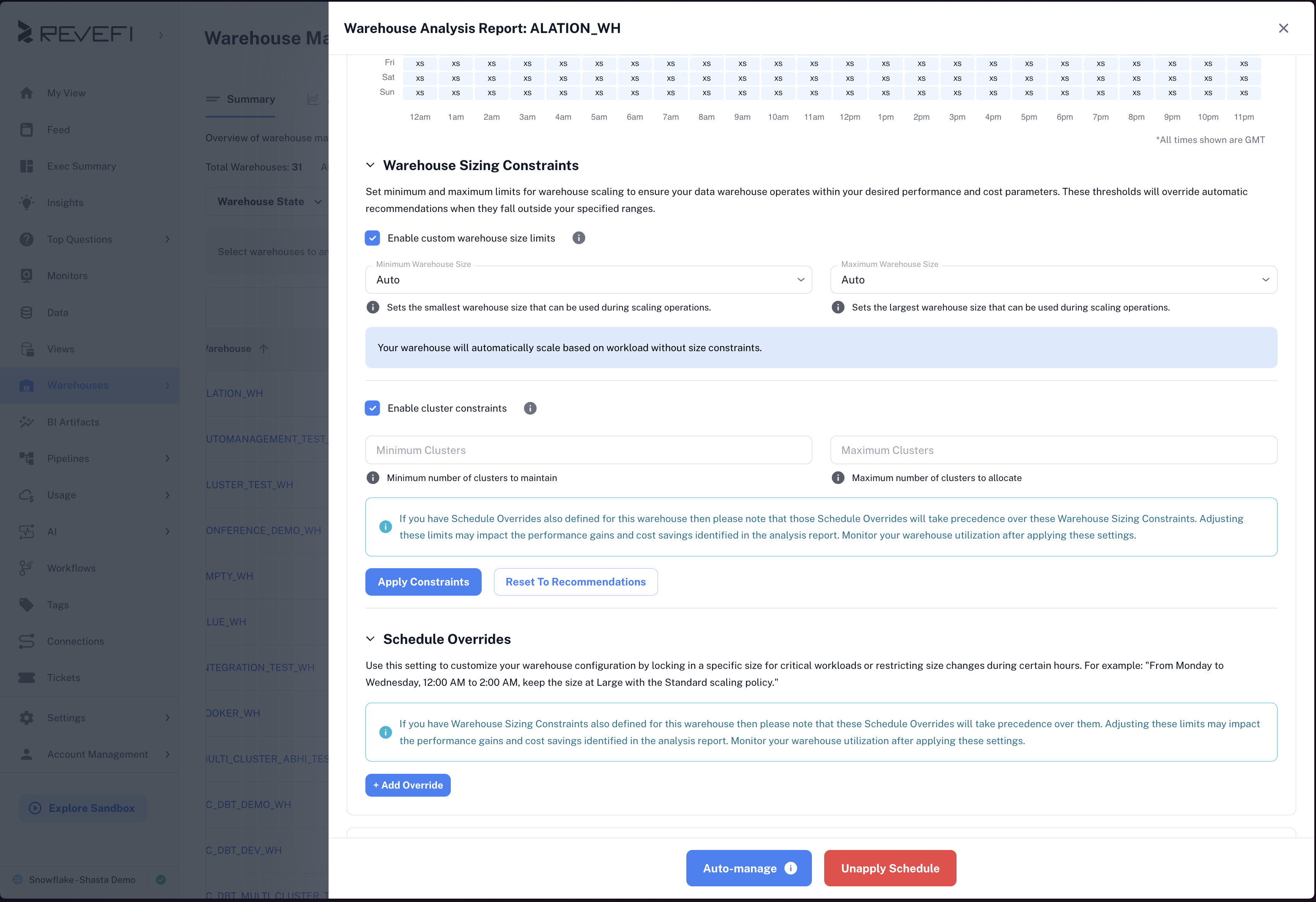
Under the Sizing Constraints section, check Limit warehouse size to enable size bounds. Set a Minimum size, a Maximum size, or both from the dropdown menus. Available sizes range from X-Small to 6X-Large, there is also an Auto option. Select Auto for either end to leave it unconstrained in that direction.
Optionally, add a Note to document why the constraint exists. Notes are visible to other users in your organization.
Cluster Constraint
For multi-cluster warehouses, check Limit cluster count and set a Minimum cluster count, Maximum cluster count, or both. Size and cluster constraints are independent — you can set one, the other, or both.
Editing or Removing a Constraint
To update a constraint, return to the Sizing Constraints section, adjust the values, and click Save. To remove a constraint entirely, click Reset or uncheck the constraint checkbox. This restores full auto-management with no size or cluster boundaries.
How Constraints Interact with Overrides
The constraints are used to create a schedule within specified bounds for the auto-managed warehouse. Overrides take precedence over the schedule, but the schedule follows constraints outside the override window.
Summary
| Setting | What It Controls |
|---|---|
| Minimum warehouse size | Smallest size Revefi will use in the generated schedule |
| Maximum warehouse size | Largest size Revefi will use in the generated schedule |
| Minimum cluster count | Fewest clusters Revefi will use (multi-cluster warehouses) |
| Maximum cluster count | Most clusters Revefi will use (multi-cluster warehouses) |
Updated 7 months ago