
Revefi for BigQuery
Revefi helps teams optimize BigQuery costs, improve query efficiency, and enforce FinOps best practices—without manual monitoring. With clear visibility, intelligent recommendations, and automated guardrails, Revefi makes it easy to keep BigQuery fast, efficient, and cost-effective.
Revefi seamlessly integrates with Google BigQuery to deliver deep visibility, intelligent recommendations, and automated guardrails—helping data teams optimize costs and performance without manual effort.
With Revefi for BigQuery, you can:
- Instantly visualize and monitor BigQuery spend, performance, and resource utilization across projects, users, and data assets
- Identify waste, cost anomalies, and inefficiencies with clear analytics and pre-built dashboards
- Receive proactive, actionable recommendations to optimize slot usage, rightsize capacity commitments, and reduce query costs
- Set automated policies and guardrails to prevent overages and enforce best practices
- Streamline incident investigation and root cause analysis with easy access to workload and cost history
Revefi connects using secure, read-only, metadata-only access; deploy in minutes with no impact on workloads.
Slot Utilization & Reservations
For BigQuery editions using slot-based pricing (Enterprise, Enterprise Plus), Revefi continuously monitors your slot utilization across reservations and provides actionable insights.
Revefi helps you:
- Identify underutilized reservations where you're paying for slots that aren't being used
- Detect periods of slot contention where queries are queuing
- Right-size your capacity commitments based on actual usage patterns
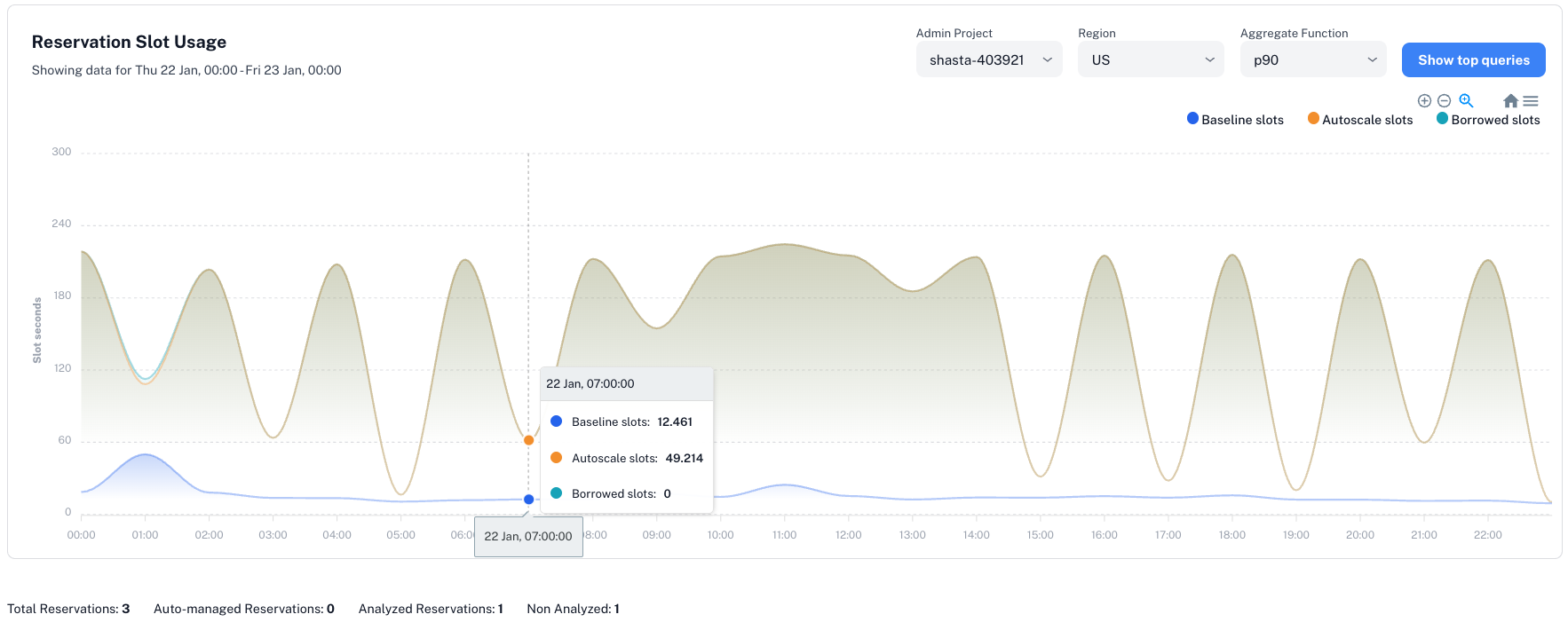
Reviewing your slot utilization is easy with Revefi:
- Click Reservations in the left navigation menu
- View utilization trends, assignment efficiency, and optimization recommendations.
- This starts at the org level, and can be narrowed down to each individual reservation
Autoscale Analysis
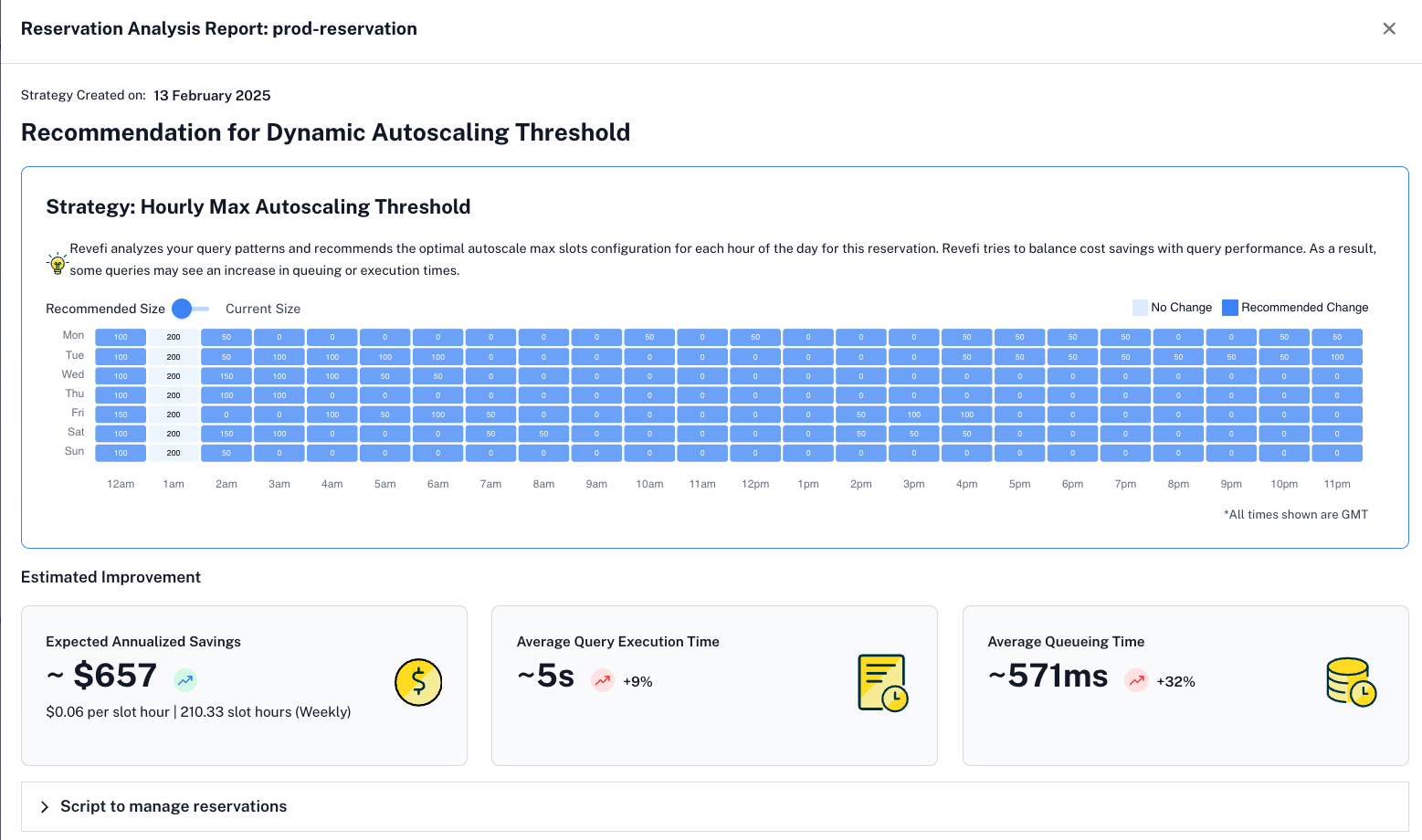
Revefi also helps you adjust autoscale thresholds for reservations that utilize autoscale slots. This can result in massive savings with minimal increases to job run or queue time. We also include a script that will adjust the max thresholds on an hour to hour basis, further optimizing costs!
Cost Calculation
BigQuery Pricing
BigQuery offers two pricing models: on-demand (pay per query) and capacity-based (slots). Below is a summary of standard pricing options:
| Pricing Model | Price | Details |
|---|---|---|
| On-Demand | $6.25/TB scanned | Pay per query; no commitment required; ideal for variable workloads |
| Baseline Slots | $0.04/slot/hour | Always-on capacity; 1-year or 3-year commitment |
| Autoscale Slots | $0.06/slot/hour | Scales up automatically; billed per second of use |
Prices shown are for Enterprise edition in US multi-region. Pricing varies by edition (Standard, Enterprise, Enterprise Plus) and region. See BigQuery pricing for current rates.
Note: If your organization's negotiated slot pricing or discounts differ from Google's published rates, Revefi can fully customize cost calculations to match your actual commitments and pricing. Contact our team to ensure that your slot usage and savings reports align to your contract terms!
For projects using custom pricing, contact Revefi to set up pricing overrides—ensuring all analytics, alerts, and optimization recommendations are based on your true rates.
Usage Analytics
Revefi provides comprehensive usage analytics to help you understand how your BigQuery resources are being consumed. Navigate to Usage in the left menu to explore:
- Usage → Project: High-level project overview and cost attribution
- Usage → User: User-level usage analysis and cost allocation
- Usage → Table: Table access patterns and optimization opportunities
- Usage → Query: Query pattern analysis and performance insights
- Usage → Failures: Failed query monitoring and investigation
Updated 9 months ago