
Revefi for Snowflake
Revefi helps teams optimize Snowflake costs, improve warehouse efficiency, and enforce FinOps best practices—without manual monitoring. With clear visibility, intelligent recommendations, and automated guardrails, Revefi makes it easy to keep Snowflake fast, efficient, and cost-effective.
Automatic Warehouse Management
Revefi can automatically manage and optimize your Snowflake warehouses to help reduce costs and enforce best-practice configurations. You can choose to let Revefi manage one, multiple, or all of your warehouses—giving you full control over the scope of automation.
Required permissions
To manage Snowflake warehouses, Revefi requires Warehouse Management privileges. Refer to these steps to grant the necessary permissions.
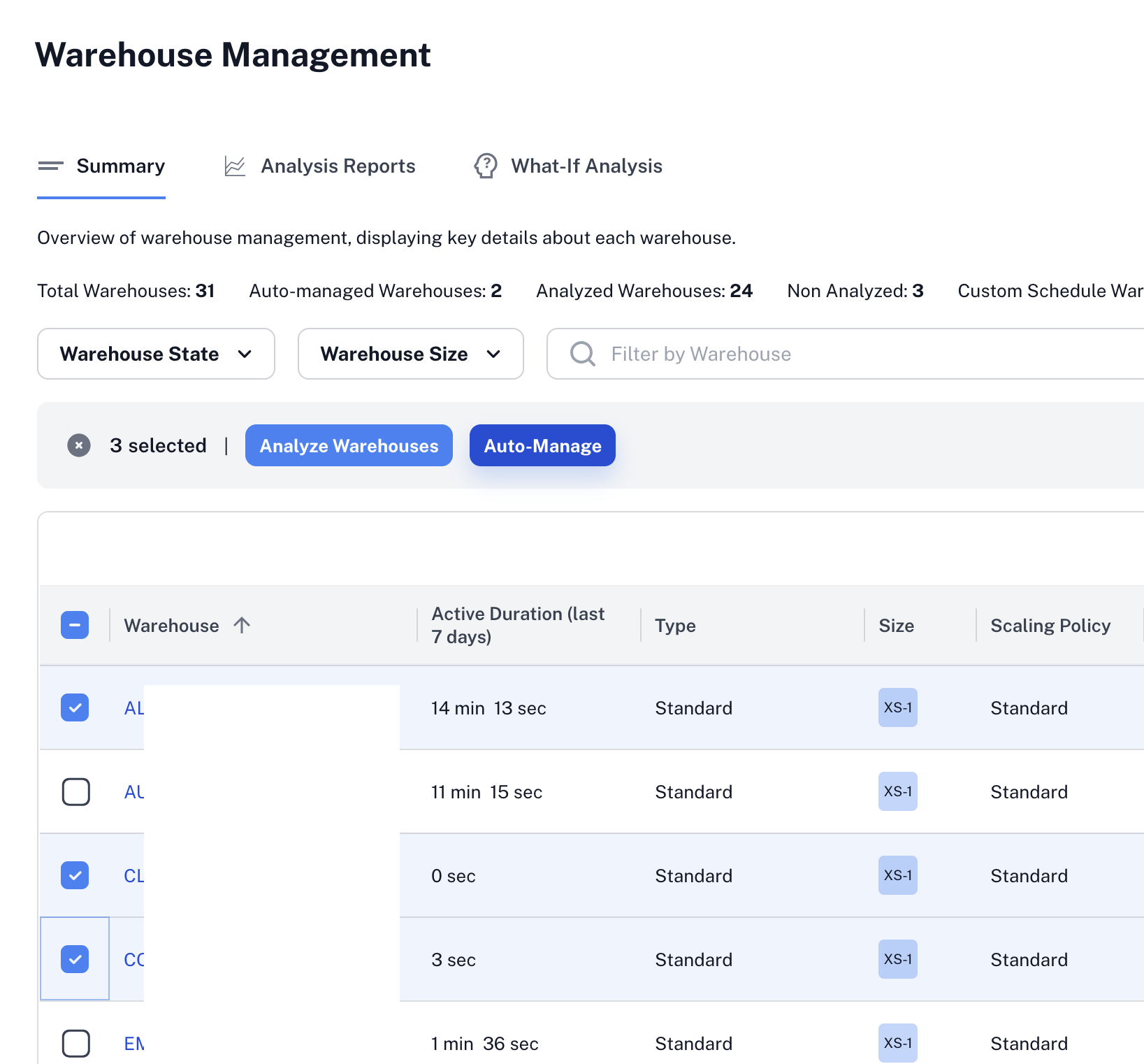
On the Warehouse Management screen (shown above), you can enable auto management for one or more warehouses. Select the warehouses by checking the boxes next to their names in the table. Once a selection is made, the Auto-Manage button appears above the table. Click Auto-Manage to place the selected warehouses under Revefi’s automatic management.
When auto management is enabled, Revefi continuously monitors and optimizes warehouse configurations—such as cost-impacting settings—to help ensure efficient usage and ongoing cost savings.
Fine-Tuning Auto-Management
While Revefi's auto-management works well out of the box, you can fine-tune its behavior to match your operational requirements:
- Sizing Constraints — Set hard boundaries on the warehouse sizes and cluster counts that Revefi is allowed to use. Useful when a warehouse must never drop below (or exceed) a certain size for SLA or budget reasons.
- Schedule Overrides — Lock in a specific warehouse size for recurring time windows. Useful for predictable workloads like nightly ETL jobs or business-hours SLAs where you want direct control during specific hours.
Warehouse Auto-Suspend
Snowflake’s default AUTO SUSPEND setting is 10 minutes. With this default configuration, Snowflake continues to bill for at least 10 minutes even when a warehouse is idle.
Revefi recommends setting AUTO SUSPEND to 1 minute to minimize unnecessary compute costs.
Revefi continuously scans your Snowflake warehouses and proactively alerts you when the AUTO SUSPEND time is set to more than 1 minute. Revefi also helps you operationally by gradually bringing the auto suspend to 1 minute while monitoring query performance.
Reviewing AUTO SUSPEND settings across your warehouses is easy with Revefi:
- Click Warehouses in the left navigation menu
- On the Warehouse Management screen, open the column selector (top-right of the table)
Refer to the image below for guidance.
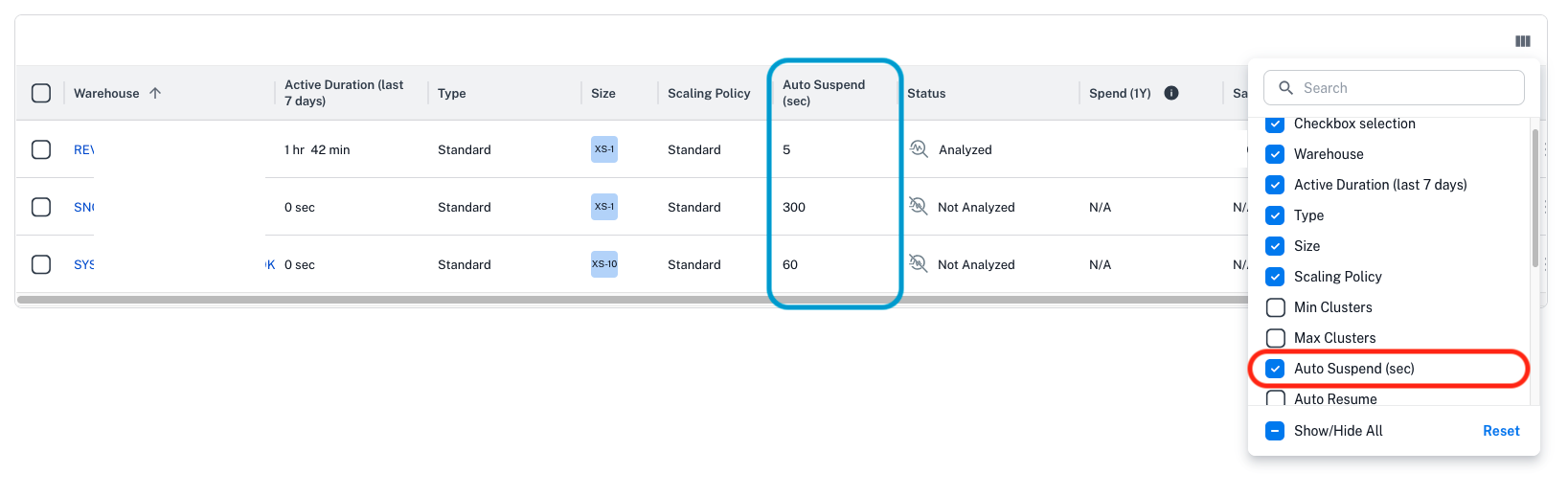
Revefi displays the auto suspend time in seconds.
Query Execution Timeout
The default Snowflake Query Execution Timeout is 2 days for warehouses (reference). Long-running queries can keep warehouses busy and incur costs unless timeouts are tuned.
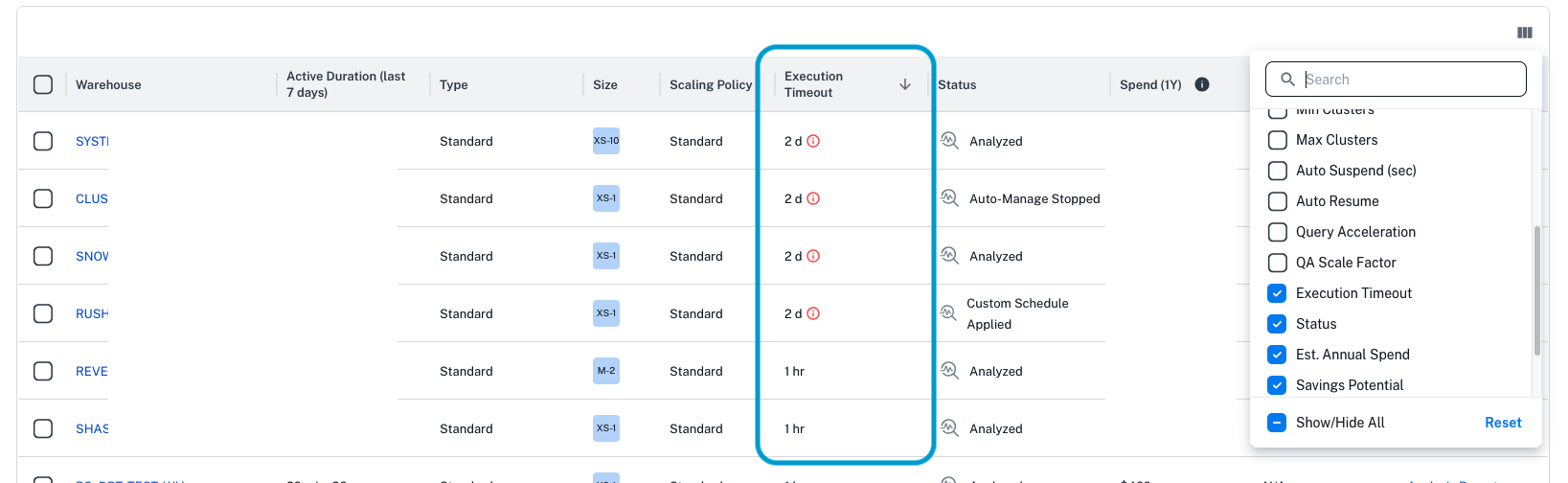
Reviewing query execution timeouts across all warehouses in your account with Revefi:
- Click Warehouses in the left navigation menu.
- On the Warehouse Management screen, open the column selector (top-right of the table).
- Enable the Execution Timeout column to surface the configured execution timeout for every warehouse.
- Sort or filter this column to quickly find warehouses that still use the 2-day default or exceed your policy threshold.
Updated 8 months ago